
This article explains how to use Dartfish Software 2026 and dartfish.tv to build a montage collaboratively. By publishing the source game to dartfish.tv first and working with lightweight storyboard project files, an analyst and a coach — or any two collaborators — can work on the same material from different locations without transferring media files.
This short video gives you a brief overview of the feature
- Purpose and Scope
- The underlying principle
- Before you start: establish the shared source
- Collaboration patterns
- Notes / Limitations
- Tips / Best practices
- See also
Purpose and Scope
In a traditional workflow, collaborating on a montage required physically transferring the video file between team members, which created version control problems and wasted time. With remote content in Dartfish Software 2026, the video stays online as a single shared source. Collaborators exchange only the storyboard project file, which is small and contains no media.
This article covers the principles behind this workflow and the two main collaboration patterns. It assumes familiarity with building a montage from remote content, which is covered in a separate article.
Requirements
- You must have a myDartfish 360 S license or higher.
- All collaborators must have download rights on the shared dartfish.tv content.
The underlying principle
A storyboard project file contains no video media. It is a lightweight set of instructions — which clips to show, in which order, with which annotations and drawings — that references the source video stored on dartfish.tv. The file itself is small enough to share by any means: email, a shared network drive, OneDrive, Google Drive, or any other file-sharing method your team already uses.
Because all collaborators point to the same remote source, there is no risk of working on different versions of the video, and no need to synchronize or merge media files. The only thing that moves between collaborators is the storyboard project file.
Key insight: dartfish.tv is the single source of truth for the media. The storyboard project file is the only artifact that needs to be shared.
Before you start: establish the shared source
The entire collaboration model depends on everyone referencing the same remote video. This means the very first step — before any montage work begins — is to publish the source game to dartfish.tv.
As soon as the analyst has the original tagged game file, they should publish it to dartfish.tv. That online version immediately becomes the shared source for all collaborators. The original local file should then be moved to an archive location and left untouched — it is no longer the working copy.
Important: Never use the local original file as the basis for montage work once it has been published. If collaborators reference different versions of the source video, the storyboard project files will no longer be compatible.
Once the game is published and the local original is archived, collaboration can begin.
If you need to work without an internet connection — on a train or plane, for example — both collaborators can make the remote media available offline before disconnecting. This is covered in the article Make a remote video available offline. Unlike the old workflow where the media file traveled with you on a USB drive or hard drive, in this workflow the media lives online by default — making it available offline is an explicit step to plan ahead for.
Collaboration patterns
Pattern 1 — One person at a time on a shared file
In this pattern, the analyst creates the storyboard project file and shares it with the coach. The coach opens it on their own machine — Dartfish automatically streams the remote video from dartfish.tv — and continues building or enriching the montage. The file can then be passed back, or further distributed to other team members.
The project file can be shared by any convenient method — email, a shared folder on OneDrive, Google Drive, a network drive, or any other file-sharing tool the team uses. The method does not matter; what matters is that everyone opens the same file and that the dartfish.tv source remains unchanged.
This pattern works best when collaborators take turns — one person works and saves, then passes the file to the next. Simultaneous edits on the same file carry a risk of conflict (see Notes / Limitations).
Pattern 2 — Parallel montages, then merge
In this pattern, each collaborator works on their own separate storyboard project file, both referencing the same remote source on dartfish.tv. For example, the analyst builds one montage and the coach builds another independently. When both are ready, one person imports the other's montage into their own and reorders the events as needed.
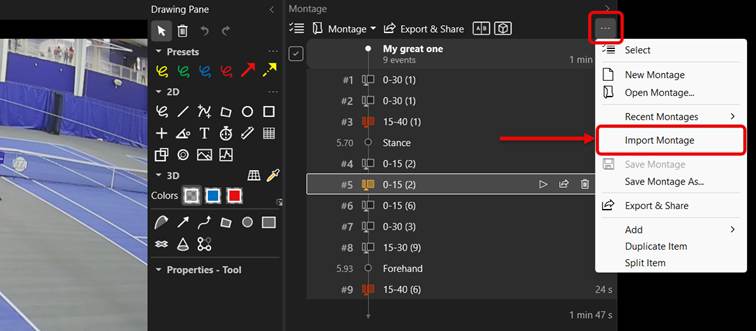
Because both files point to the same remote video, the import resolves correctly — there are no broken references or media conflicts. The person doing the merge may need to reorder or reorganize events from both montages, but this is a straightforward manual step.
This pattern eliminates the risk of simultaneous edit conflicts entirely and is the recommended approach when both collaborators are working at the same time.
Notes / Limitations
- Important: Dartfish Software 2026 currently has no mechanism to prevent or detect simultaneous edit conflicts on a storyboard project file. If two people save the same file at roughly the same time, the last save wins and the other person's changes are lost. In practice this is rare — collaborators are usually in contact — but it should be kept in mind. Pattern 2 (parallel montages) avoids this risk entirely.
- All collaborators must have download rights on the dartfish.tv content used in the montage. Without download rights, the storyboard project file will open but the remote video will not stream.
Tips / Best practices
- Publish the source game to dartfish.tv immediately after tagging — before distributing any storyboard project file. This ensures everyone starts from the same source.
- Archive the original local file as soon as it is published. Label it clearly (e.g. "ARCHIVE — do not edit") to avoid accidental use.
- If you or your collaborator need to work without an internet connection — on a plane or train, for example — make the remote media available offline before disconnecting. See Making a remote video available offline. Unlike the previous workflow where the media traveled with you on a physical drive, in this workflow the media lives on dartfish.tv by default — going offline requires planning ahead.
- When using a shared folder (OneDrive, Google Drive, network drive), agree on a clear naming convention for storyboard project files so collaborators always know which file to open.
- Prefer Pattern 2 (parallel montages) when both collaborators are working at the same time. Reserve Pattern 1 for sequential workflows where only one person edits at a time.
- When merging two montages in Pattern 2, agree in advance on who does the merge — this avoids a situation where both people attempt to merge simultaneously.